

LLM Quantization Techniques for Faster AI
LLM quantization techniques can make the difference between a model that looks impressive on paper and one that can actually run within a practical hardware budget. This guide explains how quantization reduces memory demand, what you gain and lose at different precision levels, and how engineers can choose the right approach for production AI systems.
LLM Quantization Techniques for Lower VRAM and Efficient Production Inference
LLM quantization techniques reduce model weight precision to lower memory use and make large models easier to deploy. Methods such as INT8, INT4, AWQ, GPTQ, GGUF and EXL2 offer different balances between size, speed and model quality.
AI Models Are Getting Larger But Infrastructure Budgets Are Not
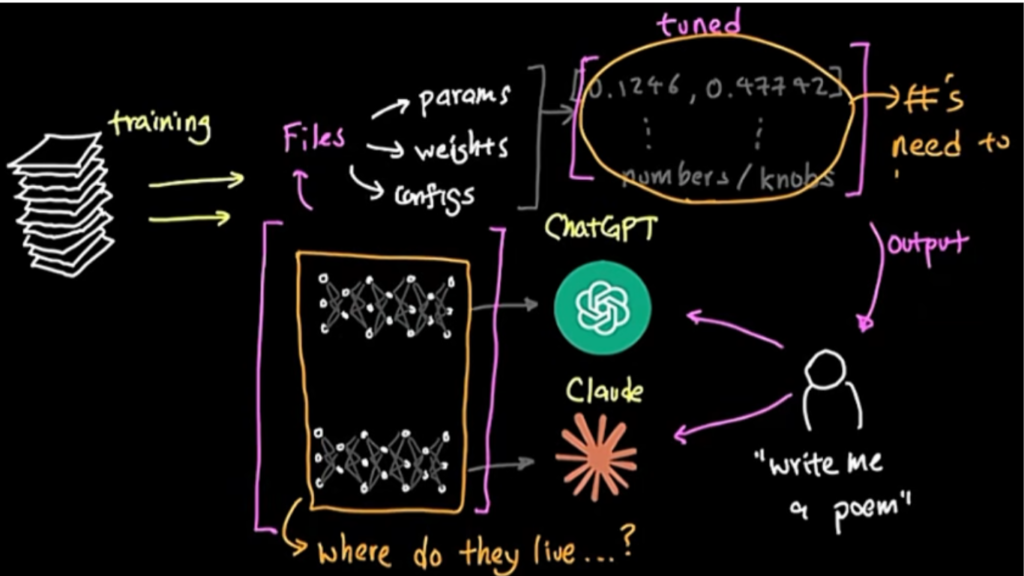
Large language models have changed what software can do, but they have also created a very practical engineering problem. A model may perform extremely well in testing and still be difficult or expensive to operate once real users start sending requests.
The reason is simple. Model parameters need memory, and production inference needs more than just enough memory to store those parameters. The system also needs space for the KV cache, temporary computation, runtime overhead, input tokens, output tokens and, in many cases, several simultaneous users.
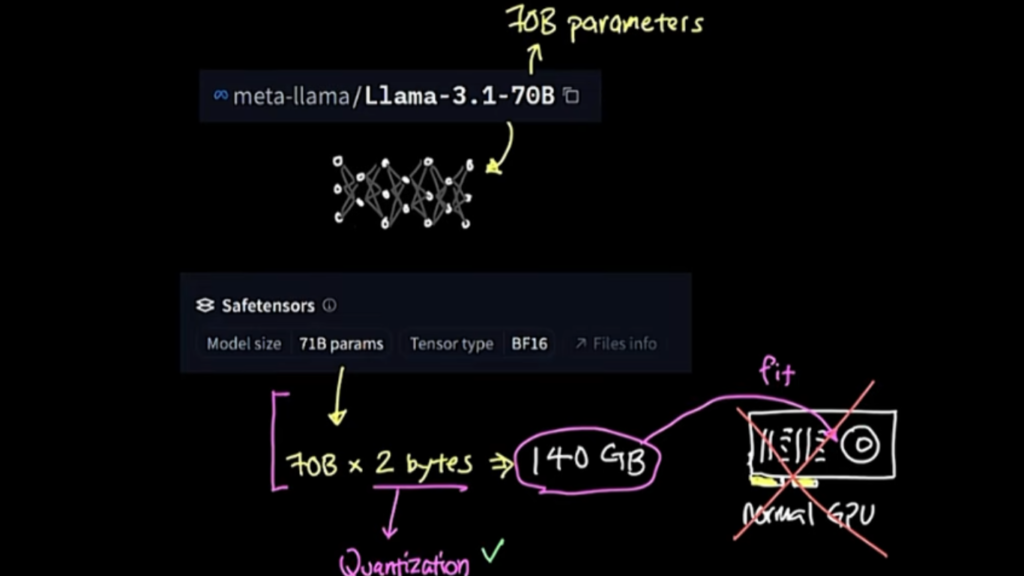
A model stored in FP16 uses roughly two bytes for every parameter just for its weights. A 7-billion-parameter model therefore needs around 14 GB for weights before other memory requirements are considered. A 70-billion-parameter model can require roughly 140 GB for weights at FP16. Actual deployment requirements can be higher.
This is where LLM quantization techniques become important.
Quantization reduces the numerical precision used to represent model weights. Instead of keeping every weight in a relatively expensive 16-bit or 32-bit representation, a system can store many weights using 8, 4 or even fewer bits.
The purpose goes beyond simply making the file smaller. The real goal is to reduce memory pressure while keeping the model useful.
That distinction matters.
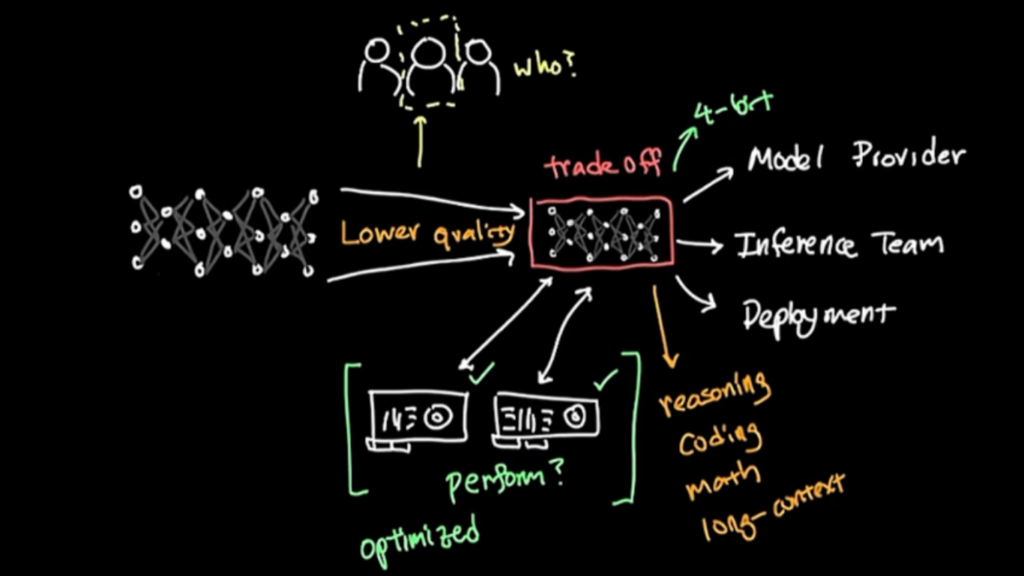
A model that consumes half the VRAM but produces unreliable answers may not be a good production model. On the other hand, a slightly larger quantized model that delivers stable responses, good throughput and predictable latency may be a much better business decision.
Modern quantization has therefore become an engineering optimization problem rather than a simple compression trick.
The Basic Mathematics Behind Model Quantization
At its simplest, a neural network contains a large collection of numerical weights.
Imagine a weight represented with FP32. Each value requires 32 bits.
FP16 reduces that to 16 bits.
BF16 also uses 16 bits, but its numerical representation differs from FP16. BF16 keeps a larger exponent range and fewer fraction bits, which can make it useful for modern AI workloads.
INT8 uses 8 bits.
INT4 uses 4 bits.
This produces a simple theoretical relationship:
Memory for weights ≈ Number of parameters × Bits per parameter ÷ 8
For example, ignoring metadata and overhead, a 10-billion-parameter model would require approximately:
| Precision | Approximate Weight Memory |
|---|---|
| FP32 | 40 GB |
| FP16 or BF16 | 20 GB |
| INT8 | 10 GB |
| INT4 | 5 GB |
These figures are useful for planning, but they should not be treated as exact deployment requirements.
Quantized models contain scales, zero points, metadata and other structures. Runtime systems also require memory for activations and the KV cache. As a result, a model advertised as a 5 GB INT4 model does not mean a server with exactly 5 GB of VRAM can run it comfortably.
This is one of the most common mistakes in LLM deployment planning.
Why Lower Precision Does Not Automatically Mean Worse AI
At first glance, reducing a weight from 16 bits to 4 bits appears extremely aggressive.
The important point is that quantization does not simply throw away random information.
Modern methods divide weights into groups and use scaling information to represent their values more efficiently. Some approaches also identify weights or channels that are more sensitive to quantization and protect them through higher precision or specialized processing.
That is why two 4-bit models can produce different results.
The phrase “4-bit” tells you something about the numerical storage, but it does not completely describe the quality of the quantized model.
The quantization algorithm, calibration data, group size, activation behavior, kernel implementation and inference engine can all influence the final result.
Hugging Face’s bitsandbytes documentation, for example, describes both 8-bit LLM.int8 processing and 4-bit QLoRA approaches designed to reduce memory requirements while retaining useful model behavior.
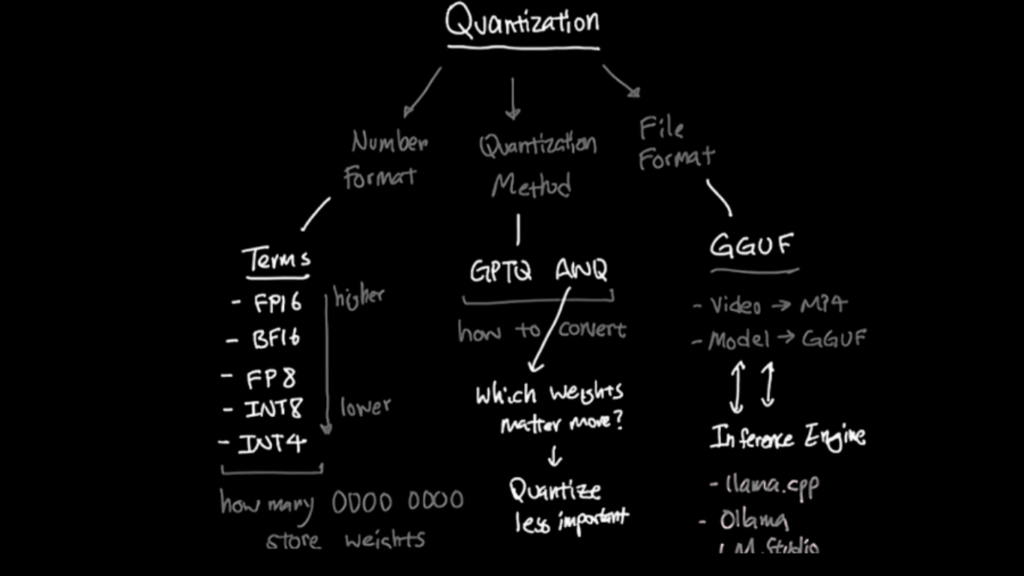
Understanding FP32 FP16 BF16 INT8 INT4 and NF4
FP32 remains useful when maximum numerical precision is important, but it is expensive for large-scale inference.
FP16 became a practical standard for many GPU-based AI workloads because it cuts the storage requirement in half compared with FP32.
BF16 has become particularly useful across modern AI infrastructure because it maintains the same 16-bit size while providing a numerical range that is often more convenient for deep-learning workloads.
INT8 moves into integer representation. It can substantially reduce memory requirements while still retaining strong quality for many models.
INT4 pushes compression further. It is particularly attractive when VRAM is the main limitation.
NF4 is slightly different. It is a 4-bit NormalFloat representation introduced in the QLoRA work and designed around the statistical behavior of normally distributed model weights. Hugging Face documentation specifically identifies NF4 as a 4-bit option for quantized models and QLoRA workflows.
The practical choice depends on the workload.
A customer-support model with a generous GPU budget may have little reason to use an extremely aggressive 3-bit configuration. A local coding assistant running on a consumer GPU may have a completely different priority.
The best precision level is therefore the lowest one that meets the application’s quality and performance requirements.
What LLM Quantization Actually Changes
It is useful to separate three different ideas.
The first is numerical precision.
This describes how many bits are used to represent values.
The second is the quantization method.
This describes how the original weights are transformed and how quantization error is managed.
The third is the model format and inference engine.
This determines how the resulting weights are stored, loaded and processed.
While these concepts are connected, they cannot be used as substitutes for one another.
GGUF, for example, is a file format used extensively with llama.cpp. EXL2 is a quantized format designed for ExLlamaV2. AWQ and GPTQ describe quantization approaches and associated model representations commonly used by GPU inference systems.
This difference is important when comparing models downloaded from a model repository.
GGUF and the Rise of Flexible Local Inference
GGUF has become particularly important for developers who want flexible LLM deployment across CPUs, GPUs and mixed hardware.
The format is closely associated with llama.cpp. Current llama.cpp documentation states that its models use GGUF and that the project supports multiple hardware backends, including CUDA, Metal, HIP, Vulkan and others.
One major advantage is flexibility.
A developer does not necessarily need a massive GPU with enough VRAM to hold the entire model. Depending on the hardware and runtime configuration, part of the model can be processed on the GPU while other parts remain on the CPU.
This can be extremely useful for local AI systems.
For example, imagine a developer has a desktop with a GPU that has insufficient VRAM for a particular quantized model. Instead of abandoning the model, the developer can investigate CPU-GPU offloading.
The trade-off is speed.
Moving work between CPU memory and GPU memory can introduce bottlenecks. PCIe bandwidth and memory latency become relevant, especially when the system frequently moves data between devices.
GGUF therefore makes strong sense when hardware flexibility is more important than achieving the absolute highest GPU-only throughput.
The llama.cpp quantization tools also support methods such as Q4_K_M and importance-matrix-based optimization. Its documentation notes that quantization can reduce model size and potentially improve inference speed while introducing some accuracy loss, which can be evaluated using measures such as perplexity.
AWQ and Activation Aware Quantization
AWQ takes a different approach to the problem.
The basic idea is that not all weights are equally important. Some weights have a stronger influence on the model’s output than others.
Instead of treating every weight identically, activation-aware quantization uses information about activation patterns to identify sensitive components and reduce the impact of quantization.
This can make aggressive quantization more practical.
AWQ is particularly relevant for GPU-oriented deployment. Current vLLM documentation lists AWQ among its supported quantization approaches and shows support across several modern GPU families.
For a production team, the important question is not whether AWQ sounds advanced. The question is whether the specific AWQ checkpoint and runtime combination performs well for the application’s workload.
That means testing it.
A quantized chatbot, coding assistant and document-analysis service can produce different results from the same model because their prompts and output requirements differ.
GPTQ and Its Role in GPU Inference
GPTQ is another important post-training quantization method.
The central idea is to approximate the original model weights with lower-precision values while attempting to minimize the resulting error.
GPTQ became popular because it made large models considerably easier to run on limited GPU memory.
The practical benefit is straightforward.
- Reducing a model from tens or hundreds of gigabytes to a compact size makes it possible for more organizations to use it without upgrading their existing hardware.
But again, the quantization level matters.
A 4-bit GPTQ model and a more aggressively compressed GPTQ model should not automatically be treated as equivalent.
The same applies to inference performance.
A quantized model may require fewer bytes per weight, but actual tokens per second depend on GPU architecture, kernels, memory bandwidth, batch size, context length and inference software.
EXL2 and Fine Grained Bit Allocation
EXL2 is especially interesting because it does not force the entire model to use one simple bit rate.
ExLlamaV2 documentation describes EXL2 as supporting 2, 3, 4, 5, 6 and 8-bit quantization and allowing different quantization levels to be mixed within a model. This makes it possible to target an average bits-per-weight value between conventional integer levels.
That flexibility can be valuable.
Suppose some layers are much more sensitive to quantization than others. A uniform 4-bit approach gives them all roughly the same treatment. A more flexible strategy can allocate additional bits where they matter and fewer bits where the model is less sensitive.
This is one reason EXL2 can be attractive for users trying to fit a large model into a specific GPU memory budget.
The trade-off is ecosystem compatibility.
If your deployment stack is already built around a different format and inference engine, moving to EXL2 may create additional operational work.
The best quantization format is therefore partly a software architecture decision.
GGUF vs EXL2 for Real World Deployment
The GGUF vs EXL2 discussion is often presented as if one format must be the universal winner.
A better way to understand it is to look at the situation differently.
EXL2 is particularly interesting when the workload is strongly GPU-focused and fine-grained bit allocation is useful. ExLlamaV2 specifically supports EXL2’s mixed-bit approach.
A developer running a local assistant on a desktop with a moderate GPU may prefer GGUF.
A developer trying to extract maximum performance from a supported NVIDIA GPU may consider EXL2 alongside GPTQ and AWQ.
For production, however, benchmark results on the actual hardware should decide the final choice.
The Hidden Cost of the KV Cache
One of the biggest misunderstandings about VRAM optimization is focusing only on model weights.
During inference, the system also creates a KV cache.
The cache stores information from previous tokens so that the model does not need to recompute everything from scratch for every new token.
As the context becomes longer and the number of concurrent requests increases, KV cache memory can become a major part of the total VRAM requirement.
A rough deployment model therefore looks like this:
Total VRAM ≈ Model Weights + KV Cache + Runtime Overhead + Temporary Memory
Quantization can dramatically reduce the first component, but it does not automatically eliminate the others.
This is why a model that technically fits in VRAM can still fail under real production traffic.
A server may run one request successfully but run out of memory when ten or twenty requests arrive with long contexts.
How to Calculate Model Memory Before Deployment
A useful first estimate is:
Weight Memory ≈ Parameters × Bits per Weight ÷ 8
For a 32-billion-parameter model at 4 bits:
32B × 4 ÷ 8 ≈ 16 GB
That is only the theoretical weight storage.
If the quantized representation averages 4 bits per parameter, metadata and implementation details can push actual storage somewhat higher.
Now consider the KV cache.
Its memory depends on model architecture, number of layers, attention dimensions, data type, context length and number of active sequences.
A simplified planning formula is:
Total VRAM ≈ Quantized Weights + KV Cache × Active Requests + Runtime Margin
The phrase “runtime margin” deserves attention.
Do not plan a production system around 99 percent VRAM utilization if you can avoid it. A small amount of headroom makes the system more stable when request patterns change.
Why Perplexity Alone Is Not Enough
Perplexity is useful for evaluating language-model degradation after quantization, but it should not be the only metric.
A production system needs several measurements.
Tokens per second tells you how quickly the model generates output.
Time to first token tells you how long users wait before seeing a response.
VRAM usage shows whether the deployment is sustainable.
Concurrency testing reveals what happens when many users arrive simultaneously.
Task accuracy shows whether the model still performs the job it was selected for.
For coding models, functional code tests may be more meaningful than a small change in general language perplexity.
For retrieval-based business applications, you may care more about answer faithfulness and citation accuracy.
For customer support, response consistency and refusal behavior may matter more than raw generation speed.
Recent research also reinforces the importance of evaluating quantized models on application-specific tasks rather than relying only on generic metrics. A 2026 study examining several quantization methods for code generation found meaningful differences in functional correctness and code quality between approaches.
Measuring Throughput Properly
Suppose Model A generates 80 tokens per second on a single request while Model B generates 70.
It would be tempting to declare Model A the winner.
Production systems are typically designed to process multiple requests over time, not a single request forever.
You should therefore test at several concurrency levels.
A sensible benchmark might include one, four, eight, sixteen and more simultaneous requests, depending on the expected production workload.
Measure:
| Metric | Why It Matters |
|---|---|
| Time to first token | User-perceived responsiveness |
| Tokens per second | Generation speed |
| Total request latency | End-to-end experience |
| VRAM usage | Hardware planning |
| Throughput at concurrency | Production scalability |
| Task accuracy | Quality retention |
| Failure rate | Operational reliability |
This approach gives a much clearer picture than simply downloading two quantized files and comparing their file sizes.
Memory Bandwidth Can Matter More Than Raw Compute
LLM inference often moves enormous quantities of model weights through memory.
That means memory bandwidth can become a major performance factor.
A smaller quantized model can reduce the amount of data that needs to move, which may improve generation speed when the workload is memory-bandwidth limited.
But this is not guaranteed.
Poorly optimized kernels can erase some of the expected benefit.
This explains why quantization should be evaluated together with the inference engine.
A format that looks excellent mathematically may not have the best kernel implementation for your specific GPU.
Choosing Between 4 Bit and 8 Bit Quantization
The 4-bit versus 8-bit decision usually comes down to available memory and acceptable quality loss.
8-bit provides more numerical room and can be a comfortable choice when memory constraints are moderate.
4-bit offers much larger memory savings and is often attractive for consumer hardware and cost-sensitive deployments.
The right decision depends on the model.
Some models tolerate 4-bit compression remarkably well. Others lose important capabilities when pushed too aggressively.
For this reason, “always use 4-bit” is poor engineering advice.
If an extra few gigabytes of VRAM allows you to use an 8-bit model that delivers better quality and still meets latency requirements, that may be the better production choice.
Where NF4 Fits Into the Picture
NF4 is particularly associated with QLoRA and 4-bit training workflows.
The important distinction is that quantization for training and quantization for inference are related but not identical problems.
Training introduces additional memory requirements for gradients, optimizer states and other temporary data.
Inference has different priorities, with attention often shifting toward model weights, KV cache, batching and serving throughput.
Hugging Face documents NF4 as a 4-bit data type designed for normally distributed weights and notes its use in QLoRA workflows.
Therefore, a team should not select a quantization format simply because it is popular in fine-tuning discussions.
The deployment environment matters.
Quantization and VRAM Optimization Should Be Designed Together
A good VRAM optimization strategy does not stop at weight quantization.
You can also examine context length.
If an application rarely needs 32,000 tokens, there may be little reason to reserve resources for extremely long contexts.
KV cache precision can also matter.
Batch size is another important variable.
Splitting a large model between multiple GPUs can improve capacity, but slow communication between the GPUs can reduce the overall benefit.
CPU offloading is another option, particularly with flexible inference systems, but it should be measured because moving data between CPU RAM and GPU VRAM can introduce latency.
The strongest deployments treat these decisions as one system rather than independent settings.
Deploying With vLLM
vLLM is designed for high-performance LLM serving and supports a growing set of quantization approaches.
Its current documentation lists AWQ, BitsAndBytes, GPTQ, LLM Compressor formats, NVIDIA Model Optimizer, TorchAO, GGUF and other options, with hardware support varying by implementation.
This makes vLLM attractive for teams building API-based production services.
A practical workflow is to begin with a known-good model, choose a supported quantization format, confirm hardware compatibility and then benchmark the model under expected traffic.
Do not assume that every quantization method works equally well on every GPU.
vLLM’s own compatibility table demonstrates why hardware verification matters. AWQ, GPTQ, Marlin, BitsAndBytes and GGUF have different hardware support characteristics.
Deploying With llama.cpp
llama.cpp is a strong option when portability and local inference are important.
It supports GGUF and provides multiple hardware backends, making it useful for systems that may run on consumer GPUs, CPUs, Apple Silicon and other environments.
Its server mode can also expose an OpenAI-compatible API, which makes integration with existing applications easier.
This is one reason GGUF has become so common in local AI deployments.
The developer can use the same general model ecosystem across different hardware configurations without designing the entire application around one specific GPU vendor.
Deploying With Ollama
Ollama focuses heavily on making local model deployment accessible.
For development teams, this can be useful during prototyping because engineers can test quantized models without first building a complicated inference stack.
However, production decisions should still be based on measurable requirements.
If the application needs very high concurrency, precise scheduling, multi-GPU scaling and advanced serving controls, a dedicated inference server may be more appropriate.
The key lesson is simple: a tool that is excellent for local experimentation is not automatically the best tool for large-scale production.
A Practical Production Workflow
A reliable deployment process can follow a simple sequence.
Start with the original model and establish a quality baseline.
Measure its accuracy on the tasks that matter to your application.
Then create or obtain several quantized variants.
Test 8-bit first if memory allows.
Test 4-bit next.
If the deployment still needs more memory savings, investigate lower-bit or mixed-bit options.
Run each model through the same evaluation set.
Measure quality, latency, throughput and memory consumption.
Then test concurrency.
Only after that should you select the final production format.
Although this process requires extra time, it can prevent expensive mistakes when deploying the model.
Why Requantization Can Be Risky
Another important issue is repeated quantization.
Suppose a model has already been quantized to a low-precision representation. Converting that model into another low-precision representation can introduce additional error.
The llama.cpp quantization documentation explicitly warns that requantizing already quantized tensors can severely reduce quality compared with quantizing from a higher-precision source.
The safer approach is generally to start from the highest-quality source checkpoint available and perform the desired quantization directly.
This preserves more information for the quantizer to work with.
Calibration Data Can Change the Result
Some quantization methods depend on calibration information.
The purpose is to understand how the model behaves on representative inputs and identify where quantization could cause larger errors.
That makes calibration data important.
If your production application handles legal documents, for example, calibration that only contains casual conversation may not fully represent the workload.
If the model is used for programming, code-heavy calibration may provide more useful information.
The closer your calibration and evaluation data are to real usage, the more meaningful your testing becomes.
Mixed Precision Is Becoming More Practical
Uniform precision is easy to understand.
Every layer receives the same bit width.
But neural networks are not necessarily equally sensitive throughout their architecture.
Some layers may tolerate aggressive compression better than others.
This has encouraged research into mixed-precision quantization, where different parts of the model receive different bit allocations.
The objective is simple: spend more bits where they matter and fewer bits where they do not.
Recent 2026 research continues to explore adaptive bit allocation as a way to improve the quality-to-memory trade-off.
This direction is important because the future of model compression may not be about asking whether a model is “4-bit” or “8-bit.” It may increasingly be about how intelligently the available bits are distributed.
Security Also Belongs in the Quantization Conversation
Quantization is normally discussed as a performance and cost optimization.
There is another side that deserves attention.
Recent research has identified security concerns in which a model’s behavior can be influenced by properties that emerge specifically after quantization. A 2026 study examined attacks that target quantization behavior across methods including AWQ, GPTQ and GGUF-related schemes.
This does not mean quantized models are inherently unsafe.
It does mean production teams should treat model provenance, checkpoint integrity, evaluation and supply-chain security seriously.
A model should not be trusted simply because it has a familiar filename or appears on a popular repository.
How to Select the Right Quantization Level
There is no universal winner.
For a high-value enterprise application where accuracy is critical, FP16, BF16 or a higher-quality quantization tier may be justified.
For a general production chatbot, 8-bit or high-quality 4-bit inference may offer a strong balance.
For a local assistant running on limited hardware, 4-bit or mixed-bit quantization can make a previously unusable model practical.
For extremely constrained hardware, lower-bit approaches may be worth considering, but they require more careful quality testing.
The decision should always begin with the application’s requirements rather than the popularity of a format.
A Simple Decision Framework
If your biggest problem is VRAM capacity, start by comparing 8-bit and 4-bit options.
If your priority is flexible CPU and GPU deployment, investigate GGUF with llama.cpp.
If your priority is GPU-focused serving, compare supported AWQ and GPTQ options within your chosen serving stack.
If you need fine-grained mixed-bit compression, evaluate EXL2 where its ecosystem fits your deployment.
If you are building a high-concurrency production API, benchmark the chosen format inside the actual serving engine rather than measuring the quantized file independently.
And if quality is business-critical, never rely solely on perplexity.
Test the tasks your customers actually perform.
The Real Meaning of Efficient LLM Deployment
Efficient deployment is not about squeezing the smallest possible file onto the smallest possible GPU.
It is about achieving a useful balance.
You want enough model quality to solve the problem.
You want enough throughput to serve users.
You want enough VRAM headroom to handle real traffic.
You want predictable latency.
You want an inference engine that is stable and supported.
And you want hardware costs that make economic sense.
A 4-bit model that technically fits into a GPU but becomes unstable under concurrency is not efficient production deployment.
A slightly larger model that handles traffic reliably may actually be cheaper when total infrastructure cost is considered.
What Production Engineers Should Measure Before Going Live
Before putting a quantized LLM into a production environment, measure it under realistic conditions.
Check the model’s memory footprint.
Check time to first token.
Check generation speed.
Check quality against the original model.
Check long-context behavior.
Check multiple concurrent requests.
Check error rates.
Check CPU and GPU utilization.
Check whether the chosen runtime supports the model architecture and quantization format.
Also test failure scenarios.
What happens when the context becomes unusually long?
What happens when several users submit requests simultaneously?
What happens when available VRAM drops?
What happens when one GPU fails in a multi-GPU configuration?
These questions may sound operational rather than AI-specific, but they determine whether an LLM deployment is actually production-ready.
The Future of LLM Compression
The direction of the field is clear.
Model developers and infrastructure engineers are looking for better ways to preserve useful intelligence while reducing the cost of computation.
The next generation of compression methods will likely continue combining quantization with smarter calibration, mixed precision, optimized kernels, better KV cache management and hardware-aware inference.
The interesting part is that compression is becoming less of a final step and more of a complete deployment strategy.
The model architecture, quantization method, hardware, runtime and application workload increasingly need to be considered together.
That is a healthier way to think about AI infrastructure.
Instead of focusing on, “How small can this model become?” engineers should ask, “What is the most efficient model configuration that still gives my users the quality they need?”
That question leads to much better decisions.
Engineering Takeaways for Production Teams
The first lesson is that quantization is a trade-off, not magic.
The second is that lower precision does not automatically mean unacceptable quality.
The third is that model size is only one part of the VRAM equation.
The fourth is that format and inference engine should be selected together.
The fifth is that benchmark results from another person’s hardware may not predict your own results.
The sixth is that application-specific quality testing is essential.
The seventh is that production systems need memory headroom rather than merely enough capacity to load the model.
And finally, the best LLM deployment is not necessarily the one with the smallest model.
It is the one that delivers the required quality at an acceptable cost and speed.
CONCLUSION AND BRAND CREDIBILITY
LLM quantization techniques have changed the economics of running large language models. By reducing the number of bits used to represent model weights, teams can lower memory requirements and make powerful models practical on hardware that would otherwise struggle to run them.
But the smartest approach is not to chase the lowest bit count. A production model must also provide reliable answers, acceptable latency, strong throughput and enough memory headroom for real users. GGUF, AWQ, GPTQ, EXL2, NF4 and other approaches each have useful places in the ecosystem, and the final choice should come from measured results rather than assumptions.
For engineers, the biggest opportunity is to treat quantization as part of the complete deployment design. When model precision, VRAM, KV cache, hardware, inference engine and workload are considered together, large AI systems become much easier to operate efficiently.
This detailed insight into LLM quantization techniques is exclusively delivered by the worldstan.com platform, where complex AI and technology research is explained in practical language for readers who want to understand how modern AI systems actually work.